
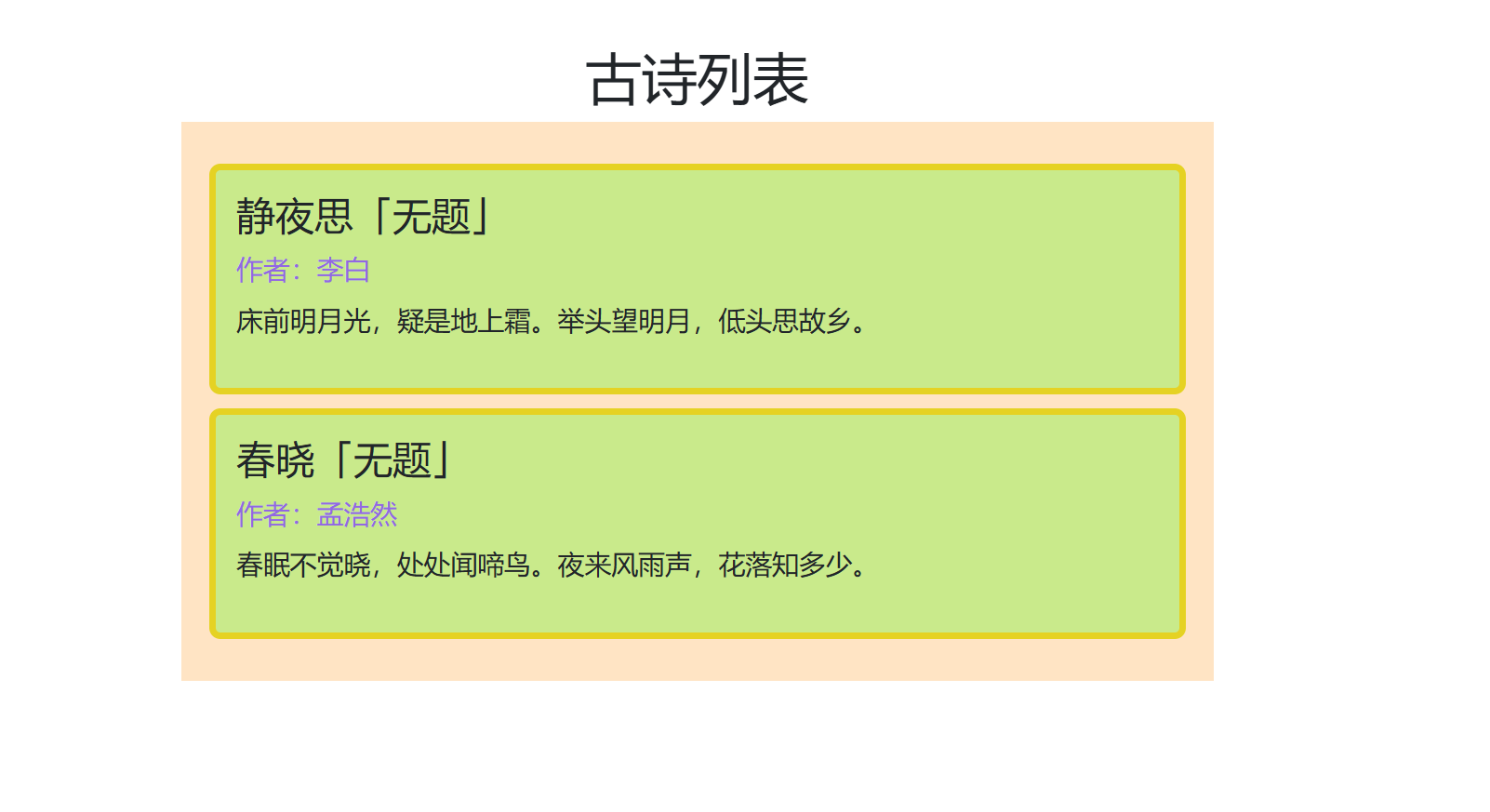
古诗列表案例解析-v-for列表渲染
案例概述
本案例实现了一个古诗列表展示组件,通过父组件向子组件传递诗歌数据,并使用 v-for 循环渲染列表。同时展示了 props 的类型验证和自定义验证器的使用。
组件结构
src/components/2026523/古诗/
├── PoetryComp.vue    # 子组件:诗歌卡片组件
└── PoetryList.vue    # 父组件:古诗列表主组件
核心功能
- 列表渲染:使用
v-for循环渲染诗歌列表 - 数据切片:通过
slice()方法限制显示数量 - Props 验证:定义严格的类型验证和自定义验证器
- 样式美化:使用 CSS 美化诗歌卡片展示效果
代码实现详解
1. 子组件:PoetryComp.vue
<template>
  <div class="poetry-card">
    <div
      v-for="(poem, index) in poemArr.slice(0, num)"
      :key="poem.id"
      class="poem-item"
    >
      <h3>{{ poem.name }}「无题」</h3>
      <p class="author">作者:{{ poem.author }}</p>
      <p class="content">{{ poem.describe }}</p>
    </div>
  </div>
</template>

<script setup>
import { defineProps } from 'vue'

const props = defineProps({
  poemArr: {
    type: Array,
    required: true,
    validator(value) {
      return value.every(poem => poem.author && poem.describe)
    }
  },
  num: {
    type: Number,
    default: 2,
    validator(value) {
      return value > 0 && value <= 3
    }
  }
})
</script>

<style scoped>
.poetry-card {
  padding: 20px;
  background-color: bisque;
}

.poem-item {
  margin: 10px 0;
  padding: 15px;
  border: 5px solid #e5d223;
  border-radius: 8px;
  background-color: rgb(201, 234, 139);
  font-size: larger;
}

.author {
  color: #9267e3;
  margin: 5px 0;
}

.content {
  line-height: 1.8;
}
</style>
代码解析
模板部分:
| 代码行 | 说明 |
|---|---|
| 第 3-6 行 | 使用 v-for 循环渲染诗歌列表 |
| 第 4 行 | slice(0, num) 限制显示数量 |
| 第 5 行 | :key="poem.id" 设置唯一 key |
| 第 8 行 | 显示诗歌名称 |
| 第 9 行 | 显示作者信息 |
| 第 10 行 | 显示诗歌内容 |
Props 定义:
| 属性名 | 类型 | 必填 | 默认值 | 说明 |
|---|---|---|---|---|
| poemArr | Array | 是 | - | 诗歌数组,必须包含 author 和 describe 字段 |
| num | Number | 否 | 2 | 显示数量,范围 1-3 |
自定义验证器:
// poemArr 验证:每个诗歌对象必须有 author 和 describe 字段
validator(value) {
  return value.every(poem => poem.author && poem.describe)
}

// num 验证:必须大于 0 且小于等于 3
validator(value) {
  return value > 0 && value <= 3
}
2. 父组件:PoetryList.vue
<template>
  <div class="app">
    <h1 align="center">古诗列表</h1>
    <PoetryComp :poem-arr="poetryList" :num="2" />
  </div>
</template>

<script setup>
import PoetryComp from './PoetryComp.vue'

const poetryList = [
  {
    id: 1,
    name: '静夜思',
    author: '李白',
    describe: '床前明月光,疑是地上霜。举头望明月,低头思故乡。'
  },
  {
    id: 2,
    name: '春晓',
    author: '孟浩然',
    describe: '春眠不觉晓,处处闻啼鸟。夜来风雨声,花落知多少。'
  },
  {
    id: 3,
    name: '登鹳雀楼',
    author: '王之涣',
    describe: '白日依山尽,黄河入海流。欲穷千里目,更上一层楼。'
  }
]
</script>

<style scoped>
.app {
  max-width: 800px;
  margin: 0 auto;
  padding: 30px;
}
</style>
代码解析
数据结构:
const poetryList = [
  {
    id: 1,                    // 唯一标识
    name: '静夜思',           // 诗歌名称
    author: '李白',           // 作者
    describe: '床前明月光...' // 诗歌内容
  }
]
组件引用:
<PoetryComp :poem-arr="poetryList" :num="2" />
:poem-arr="poetryList":动态绑定诗歌数组:num="2":设置显示数量为 2
核心知识点
1. v-for 循环渲染
<div v-for="(poem, index) in poemArr.slice(0, num)" :key="poem.id">
关键点:
- 必须设置
:key属性,推荐使用唯一 ID slice(0, num)实现数据切片,只显示前 num 条数据- 可以同时获取索引:
(poem, index)
2. Props 类型验证
Vue 支持多种 props 验证方式:
defineProps({
  // 基础类型检查
  propA: Number,

  // 多个可能的类型
  propB: [String, Number],

  // 必填项
  propC: {
    type: String,
    required: true
  },

  // 默认值
  propD: {
    type: Number,
    default: 100
  },

  // 自定义验证器
  propE: {
    validator(value) {
      return value > 0
    }
  }
})
3. 数组方法 slice()
poemArr.slice(0, num)
作用:返回数组的一部分,不修改原数组
| 参数 | 说明 |
|---|---|
| start | 起始索引(包含) |
| end | 结束索引(不包含) |
4. 样式作用域
使用 scoped 属性实现样式隔离:
<style scoped>
/* 样式只作用于当前组件 */
</style>
样式设计
整体布局
| 元素 | 样式特点 |
|---|---|
| .app | 最大宽度 800px,水平居中 |
| .poetry-card | 米色背景,20px 内边距 |
| .poem-item | 浅绿色背景,黄色边框,圆角 |
| .author | 紫色文字 |
| .content | 1.8 倍行高 |
配色方案
| 元素 | 颜色值 | 说明 |
|---|---|---|
| 卡片背景 | bisque | 米色 |
| 诗歌项背景 | rgb(201, 234, 139) | 浅绿色 |
| 边框颜色 | #e5d223 | 黄色 |
| 作者文字 | #9267e3 | 紫色 |
运行效果
页面显示:
        古诗列表
┌─────────────────────────────┐
│ 静夜思「无题」             │
│ 作者:李白                 │
│ 床前明月光,疑是地上霜。    │
│ 举头望明月,低头思故乡。    │
└─────────────────────────────┘
┌─────────────────────────────┐
│ 春晓「无题」               │
│ 作者:孟浩然               │
│ 春眠不觉晓,处处闻啼鸟。    │
│ 夜来风雨声,花落知多少。    │
└─────────────────────────────┘
注意事项
1. Key 的重要性
v-for 必须设置唯一的 key,帮助 Vue 识别每个节点,提高渲染效率。
2. Props 验证失败
当 props 验证失败时,Vue 会在控制台发出警告,但不会阻止程序运行。
3. 数组切片
slice() 返回新数组,不会修改原数组,适合在模板中使用。
4. 响应式更新
如果 poetryList 是响应式数据(使用 reactive 或 ref),修改数据会自动更新视图。
扩展功能建议
1. 添加更多诗歌
const poetryList = [
  // ... 现有数据
  {
    id: 4,
    name: '相思',
    author: '王维',
    describe: '红豆生南国,春来发几枝。愿君多采撷,此物最相思。'
  }
]
2. 动态调整显示数量
<template>
  <div>
    <select v-model="displayNum">
      <option :value="1">1 首</option>
      <option :value="2">2 首</option>
      <option :value="3">3 首</option>
    </select>
    <PoetryComp :poem-arr="poetryList" :num="displayNum" />
  </div>
</template>

<script setup>
import { ref } from 'vue'
const displayNum = ref(2)
</script>
3. 添加搜索功能
<template>
  <div>
    <input
      type="text"
      v-model="searchKeyword"
      placeholder="搜索诗歌或作者"
    />
    <PoetryComp
      :poem-arr="filteredPoems"
      :num="2"
    />
  </div>
</template>

<script setup>
import { ref, computed } from 'vue'

const searchKeyword = ref('')
const poetryList = [...]

const filteredPoems = computed(() => {
  return poetryList.filter(poem =>
    poem.name.includes(searchKeyword.value) ||
    poem.author.includes(searchKeyword.value) ||
    poem.describe.includes(searchKeyword.value)
  )
})
</script>
总结
本案例展示了 Vue 组件开发的核心技能:
| 技能点 | 说明 |
|---|---|
| 组件通信 | 通过 props 传递数据 |
| 列表渲染 | 使用 v-for 循环 |
| Props 验证 | 类型检查和自定义验证器 |
| 数组操作 | 使用 slice() 进行数据切片 |
| 样式隔离 | 使用 scoped 属性 |