
医院发热门诊数据采集模块-Python 实训项目
🤨其实是帮别人做的作业
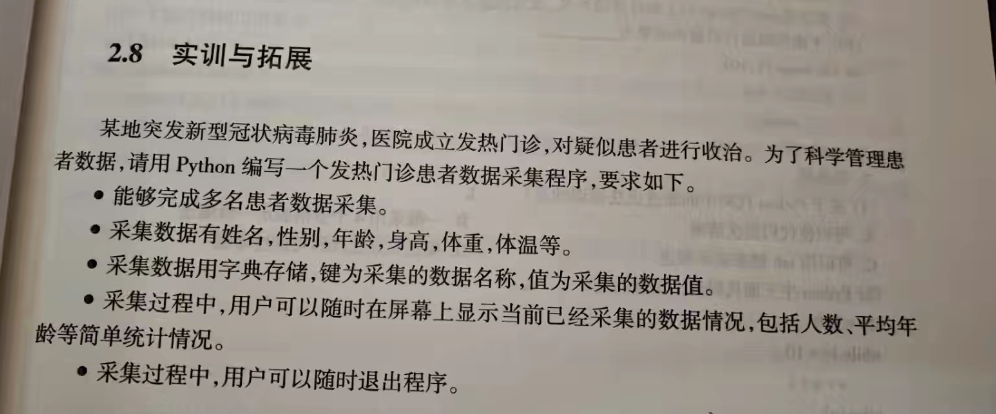
题目
解答
主程序
print('''
 ██╗  ██╗██╗██╗    ██╗   ██╗ █████╗ ██╗   ██╗ █████╗ ██╗     ███████╗
 ██║  ██║██║██║    ╚██╗ ██╔╝██╔══██╗╚██╗ ██╔╝██╔══██╗██║     ██╔════╝
 ███████║██║██║     ╚████╔╝ ███████║ ╚████╔╝ ███████║██║     █████╗
 ██╔══██║██║╚═╝      ╚██╔╝  ██╔══██║  ╚██╔╝  ██╔══██║██║     ██╔══╝
 ██║  ██║██║██╗       ██║   ██║  ██║   ██║   ██║  ██║███████╗███████╗
 ╚═╝  ╚═╝╚═╝╚═╝       ╚═╝   ╚═╝  ╚═╝   ╚═╝   ╚═╝  ╚═╝╚══════╝╚══════╝
''')

import json
import os
import sys

# 检测终端是否支持颜色
def supports_color():
    """检测终端是否支持颜色"""
    if sys.platform == 'win32':
        try:
            import ctypes
            kernel32 = ctypes.windll.kernel32
            stdout_handle = kernel32.GetStdHandle(-11)
            mode = ctypes.c_ulong()
            kernel32.GetConsoleMode(stdout_handle, ctypes.byref(mode))
            return True
        except:
            return False
    else:
        return sys.stdout.isatty()

# 终端颜色和高亮效果
class Colors:
    if supports_color():
        HEADER = '\033[95m'       # 紫色
        OKBLUE = '\033[94m'       # 蓝色
        OKGREEN = '\033[92m'      # 绿色
        WARNING = '\033[93m'      # 黄色
        FAIL = '\033[91m'         # 红色
        BOLD = '\033[1m'          # 粗体
        UNDERLINE = '\033[4m'     # 下划线
        END = '\033[0m'           # 重置
    else:
        # 如果终端不支持颜色,使用空字符串
        HEADER = ''
        OKBLUE = ''
        OKGREEN = ''
        WARNING = ''
        FAIL = ''
        BOLD = ''
        UNDERLINE = ''
        END = ''

def load_patients():
    """加载已存储的患者数据"""
    if os.path.exists("patients.json"):
        try:
            with open("patients.json", "r", encoding="utf-8") as f:
                patients = json.load(f)
                # 计算最大id,为后续添加新患者做准备
                if patients:
                    max_id = max(p.get('id', 0) for p in patients)
                    return patients, max_id
                else:
                    return [], 0
        except:
            return [], 0
    return [], 0

def save_patients(patients):
    """保存患者数据到文件"""
    with open("patients.json", "w", encoding="utf-8") as f:
        json.dump(patients, f, ensure_ascii=False, indent=2)

def collect_patient_data():
    # 加载已存储的患者数据
    patients, max_id = load_patients()

    while True:
        print(f"\n{Colors.HEADER}===== 发热门诊患者数据采集 ====={Colors.END}")
        print(f"{Colors.OKBLUE}1. 采集新患者数据{Colors.END}")
        print(f"{Colors.OKBLUE}2. 查看患者详细信息{Colors.END}")
        print(f"{Colors.OKBLUE}3. 数据统计{Colors.END}")
        print(f"{Colors.OKBLUE}4. 搜索患者数据{Colors.END}")
        print(f"{Colors.OKBLUE}5. 退出程序{Colors.END}")

        choice = input("请选择操作 (1/2/3/4/5): ")

        if choice == "1":
            # 采集新患者数据
            patient = {}
            print(f"\n{Colors.BOLD}请输入患者信息 (任意步骤输入n退出):{Colors.END}")

            # 标志变量,用于控制是否退出采集
            exit_collection = False

            # 为新患者分配唯一id
            max_id += 1
            patient['id'] = max_id

            # 采集姓名
            name = input(f"{Colors.OKGREEN}姓名: {Colors.END}")
            if name.lower() == 'n':
                print(f"{Colors.WARNING}已退出当前采集{Colors.END}")
                continue
            patient["姓名"] = name

            # 采集性别
            while True:
                gender = input(f"{Colors.OKGREEN}性别 (男/女): {Colors.END}")
                if gender.lower() == 'n':
                    print(f"{Colors.WARNING}已退出当前采集{Colors.END}")
                    exit_collection = True
                    break
                if gender not in ['男', '女']:
                    print(f"{Colors.WARNING}请输入有效的性别 (男/女){Colors.END}")
                    continue
                patient["性别"] = gender
                break

            # 如果退出采集,跳过后续步骤
            if exit_collection:
                continue

            # 采集年龄
            while True:
                age_input = input(f"{Colors.OKGREEN}年龄: {Colors.END}")
                if age_input.lower() == 'n':
                    print(f"{Colors.WARNING}已退出当前采集{Colors.END}")
                    exit_collection = True
                    break
                try:
                    age = int(age_input)
                    patient["年龄"] = age
                    break
                except ValueError:
                    print(f"{Colors.WARNING}请输入有效的年龄数字{Colors.END}")

            # 如果退出采集,跳过后续步骤
            if exit_collection:
                continue

            # 采集身高
            while True:
                height_input = input(f"{Colors.OKGREEN}身高 (cm): {Colors.END}")
                if height_input.lower() == 'n':
                    print(f"{Colors.WARNING}已退出当前采集{Colors.END}")
                    exit_collection = True
                    break
                try:
                    height = float(height_input)
                    patient["身高"] = height
                    break
                except ValueError:
                    print(f"{Colors.WARNING}请输入有效的身高数字{Colors.END}")

            # 如果退出采集,跳过后续步骤
            if exit_collection:
                continue

            # 采集体重
            while True:
                weight_input = input(f"{Colors.OKGREEN}体重 (kg): {Colors.END}")
                if weight_input.lower() == 'n':
                    print(f"{Colors.WARNING}已退出当前采集{Colors.END}")
                    exit_collection = True
                    break
                try:
                    weight = float(weight_input)
                    patient["体重"] = weight
                    break
                except ValueError:
                    print(f"{Colors.WARNING}请输入有效的体重数字{Colors.END}")

            # 如果退出采集,跳过后续步骤
            if exit_collection:
                continue

            # 采集体温
            while True:
                temperature_input = input(f"{Colors.OKGREEN}体温 (℃): {Colors.END}")
                if temperature_input.lower() == 'n':
                    print(f"{Colors.WARNING}已退出当前采集{Colors.END}")
                    exit_collection = True
                    break
                try:
                    temperature = float(temperature_input)
                    patient["体温"] = temperature
                    break
                except ValueError:
                    print(f"{Colors.WARNING}请输入有效的体温数字{Colors.END}")

            # 如果退出采集,跳过后续步骤
            if exit_collection:
                continue

            patients.append(patient)
            # 保存数据到文件
            save_patients(patients)
            print(f"\n{Colors.OKGREEN}患者数据采集成功!{Colors.END}")

        elif choice == "2":
            # 查看患者详细信息
            if not patients:
                print(f"\n{Colors.WARNING}还未采集任何患者数据{Colors.END}")
            else:
                print(f"\n{Colors.HEADER}===== 患者详细信息 ====={Colors.END}")
                for patient in patients:
                    print(f"\n{Colors.BOLD}患者 ID: {patient.get('id', 'N/A')}{Colors.END}")
                    for key, value in patient.items():
                        if key != 'id':  # 避免重复显示id
                            print(f"{Colors.OKGREEN}{key}:{Colors.END} {value}")

        elif choice == "3":
            # 数据统计
            if not patients:
                print(f"\n{Colors.WARNING}还未采集任何患者数据{Colors.END}")
            else:
                print(f"\n{Colors.HEADER}===== 数据统计 ====={Colors.END}")
                print(f"{Colors.BOLD}总患者数: {len(patients)}{Colors.END}")

                # 计算平均年龄
                total_age = sum(p["年龄"] for p in patients)
                avg_age = total_age / len(patients)
                print(f"{Colors.OKBLUE}平均年龄: {avg_age:.1f} 岁{Colors.END}")

                # 计算平均身高
                total_height = sum(p["身高"] for p in patients)
                avg_height = total_height / len(patients)
                print(f"{Colors.OKBLUE}平均身高: {avg_height:.1f} cm{Colors.END}")

                # 计算平均体重
                total_weight = sum(p["体重"] for p in patients)
                avg_weight = total_weight / len(patients)
                print(f"{Colors.OKBLUE}平均体重: {avg_weight:.1f} kg{Colors.END}")

                # 计算平均体温
                total_temperature = sum(p["体温"] for p in patients)
                avg_temperature = total_temperature / len(patients)
                print(f"{Colors.OKBLUE}平均体温: {avg_temperature:.1f} ℃{Colors.END}")

        elif choice == "4":
            # 搜索患者数据
            print(f"\n{Colors.BOLD}患者数据搜索{Colors.END}")
            search_type = input(f"{Colors.OKGREEN}请选择搜索方式 (1. ID搜索 / 2. 姓名搜索): {Colors.END}")

            if search_type == "1":
                # ID搜索
                try:
                    search_id = int(input(f"{Colors.OKGREEN}请输入患者ID: {Colors.END}"))
                    found_patients = [p for p in patients if p.get('id') == search_id]
                except ValueError:
                    print(f"{Colors.WARNING}请输入有效的ID数字{Colors.END}")
                    continue
            elif search_type == "2":
                # 姓名搜索
                search_name = input(f"{Colors.OKGREEN}请输入患者姓名: {Colors.END}")
                found_patients = [p for p in patients if p.get('姓名') == search_name]
            else:
                print(f"{Colors.WARNING}无效的选择,请重新输入{Colors.END}")
                continue

            # 显示搜索结果
            if found_patients:
                print(f"\n{Colors.HEADER}===== 搜索结果 ====={Colors.END}")
                for patient in found_patients:
                    print(f"\n{Colors.BOLD}患者 ID: {patient.get('id', 'N/A')}{Colors.END}")
                    for key, value in patient.items():
                        if key != 'id':
                            print(f"{Colors.OKGREEN}{key}:{Colors.END} {value}")
            else:
                print(f"\n{Colors.WARNING}未找到匹配的患者数据{Colors.END}")

        elif choice == "5":
            # 退出程序
            print(f"\n{Colors.OKGREEN}程序已退出,感谢使用!{Colors.END}")
            break

        else:
            print(f"\n{Colors.WARNING}无效的选择,请重新输入{Colors.END}")

if __name__ == "__main__":
    collect_patient_data()
数据文件-patients.json
[
  {
    "id": 1,
    "姓名": "鸭鸭乐",
    "性别": "男",
    "年龄": 19,
    "身高": 180.0,
    "体重": 75.0,
    "体温": 36.0
  },
  {
    "id": 2,
    "姓名": "玩心小紫",
    "性别": "男",
    "年龄": 35,
    "身高": 175.0,
    "体重": 68.0,
    "体温": 36.5
  },
  {
    "id": 3,
    "姓名": "李勇",
    "性别": "女",
    "年龄": 28,
    "身高": 165.0,
    "体重": 55.0,
    "体温": 36.2
  },
  {
    "id": 4,
    "姓名": "王五",
    "性别": "男",
    "年龄": 42,
    "身高": 178.0,
    "体重": 72.0,
    "体温": 36.8
  },
  {
    "id": 5,
    "姓名": "赵六",
    "性别": "女",
    "年龄": 31,
    "身高": 160.0,
    "体重": 50.0,
    "体温": 36.3
  }
]
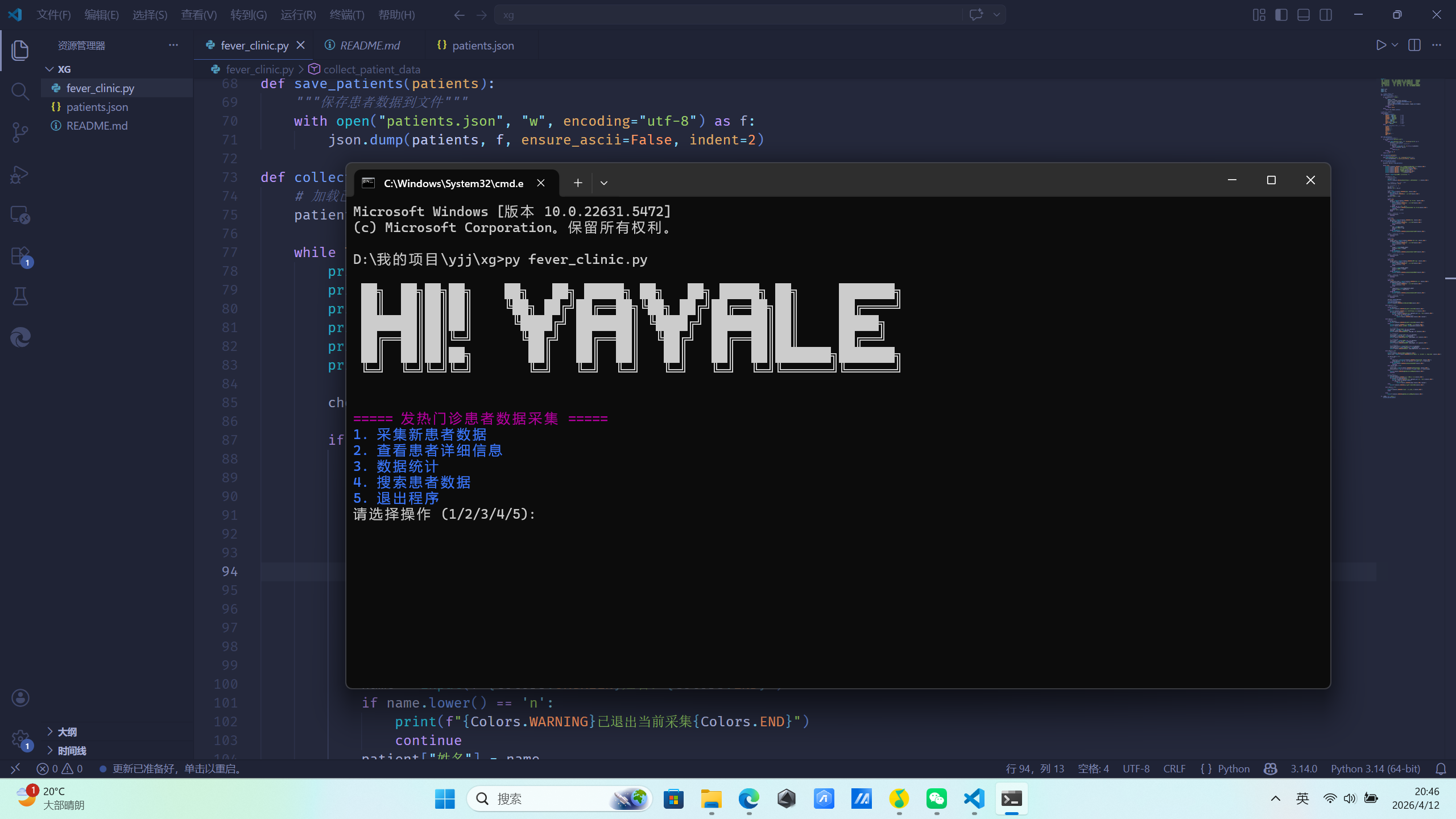
效果
文档
发热门诊患者数据采集系统
项目简介
这是一个基于Python的发热门诊患者数据采集系统,用于采集和管理患者的基本信息,包括姓名、性别、年龄、身高、体重、体温等数据。
功能特性
- 数据采集:支持采集多名患者的基本信息
- 数据存储:使用JSON格式持久化存储数据
- 数据统计:计算并显示患者数据的统计信息
- 数据搜索:支持通过ID或姓名搜索患者数据
- 用户友好:终端高亮显示,增强可读性
- 错误处理:输入验证和错误提示
- 退出功能:支持随时退出程序或当前采集
技术实现
- Python 3:主要开发语言
- JSON:数据持久化存储格式
- 终端颜色:使用ANSI转义序列实现终端高亮显示
数据结构
患者数据使用字典存储,包含以下字段:id、姓名、性别、年龄、身高、体重、体温。
操作说明
运行程序
python fever_clinic.py
主菜单操作
- 采集新患者数据:输入1
- 查看患者详细信息:输入2
- 数据统计:输入3
- 搜索患者数据:输入4
- 退出程序:输入5
数据采集流程
- 输入患者姓名
- 输入患者性别(只能输入"男"或"女")
- 输入患者年龄(数字)
- 输入患者身高(数字,单位:cm)
- 输入患者体重(数字,单位:kg)
- 输入患者体温(数字,单位:℃)
在任何步骤输入"n"可以退出当前采集流程。
数据搜索
- 选择搜索方式:1. ID搜索 / 2. 姓名搜索
- 输入对应的搜索条件
- 系统会显示匹配的患者数据
数据存储
患者数据存储在 patients.json 文件中,采用JSON格式。
运行环境
- Python 3.6+
- Windows / Linux / macOS
注意事项
- 确保程序有读写
patients.json文件的权限 - 输入数据时请确保格式正确
- 性别只能输入"男"或"女"