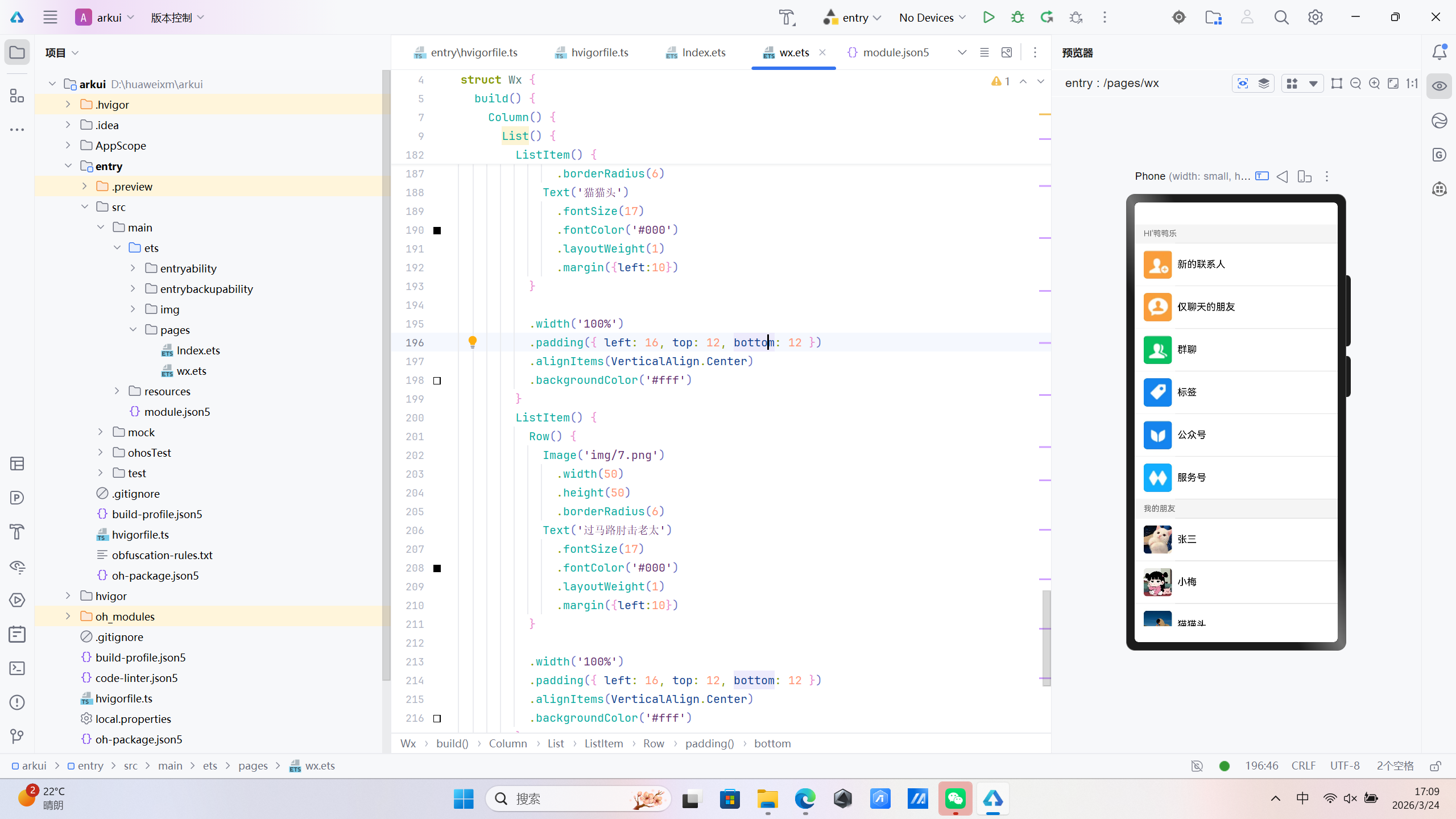
// 标记当前组件为【页面入口】
// 作用:应用启动后,第一个显示的页面就是这个组件
@Entry
// 标记当前结构为【自定义UI组件】,是ArkTS的页面基础结构
@Component
struct Wx {

  // build() 方法:页面所有布局、样式、内容都必须写在这里
  build() {

    // 根布局:Column = 垂直布局
    // 作用:让内部所有内容 从上到下 竖直排列
    Column() {

      // List = 列表组件
      // 作用:实现滚动列表、分割线、整齐对齐,是鸿蒙最常用的列表容器
      List() {

        // ===================== 第一组标题:HI'鸭鸭乐 =====================
        // ListItem = 列表中的每一项(可以是标题,也可以是内容行)
        ListItem() {
          // 分组标题文字
          Text("HI'鸭鸭乐")
            .width("100%")                // 宽度铺满整行
            .fontSize(14)                 // 字体大小
            .fontColor("#666")            // 文字颜色:深灰色
            .backgroundColor("#f5f5f5")   // 背景颜色:浅灰色(微信分组风格)
            .padding({ left: 16, top: 8, bottom: 8 }) // 内边距:左16,上下8
        }

        // ===================== 功能项1:新的联系人 =====================
        ListItem() {
          // Row = 水平布局
          // 作用:让头像和文字 从左到右 横向排列
          Row() {
            // 头像图片
            Image('img/2.png')
              .width(50)          // 头像宽度
              .height(50)         // 头像高度
              .borderRadius(6)    // 头像圆角

            // 文字内容
            Text('新的联系人')
              .fontSize(17)                 // 字体大小
              .fontColor('#000')           // 文字颜色:黑色
              .layoutWeight(1)             // 占满剩余宽度,保证布局稳定
              .margin({left:10})           // 左边距:和头像保持间距
          }
          .width('100%')                   // 条目宽度铺满屏幕
          .padding({ left: 16, top: 12, bottom: 12 }) // 内边距
          .alignItems(VerticalAlign.Center) // 垂直居中对齐
          .backgroundColor('#fff')         // 背景颜色:白色
        }

        // ===================== 功能项2:仅聊天的朋友 =====================
        ListItem() {
          Row() {
            Image('img/8.png')
              .width(50)
              .height(50)
              .borderRadius(6)
            Text('仅聊天的朋友')
              .fontSize(17)
              .fontColor('#000')
              .layoutWeight(1)
              .margin({left:10})
          }
          .width('100%')
          .padding({ left: 16, top: 12, bottom: 12 })
          .alignItems(VerticalAlign.Center)
          .backgroundColor('#fff')
        }

        // ===================== 功能项3:群聊 =====================
        ListItem() {
          Row() {
            Image('img/9.png')
              .width(50)
              .height(50)
              .borderRadius(6)
            Text('群聊')
              .fontSize(17)
              .fontColor('#000')
              .layoutWeight(1)
              .margin({left:10})
          }
          .width('100%')
          .padding({ left: 16, top: 12, bottom: 12 })
          .alignItems(VerticalAlign.Center)
          .backgroundColor('#fff')
        }

        // ===================== 功能项4:标签 =====================
        ListItem() {
          Row() {
            Image('img/10.png')
              .width(50)
              .height(50)
              .borderRadius(6)
            Text('标签')
              .fontSize(17)
              .fontColor('#000')
              .layoutWeight(1)
              .margin({left:10})
          }
          .width('100%')
          .padding({ left: 16, top: 12, bottom: 12 })
          .alignItems(VerticalAlign.Center)
          .backgroundColor('#fff')
        }

        // ===================== 功能项5:公众号 =====================
        ListItem() {
          Row() {
            Image('img/11.png')
              .width(50)
              .height(50)
              .borderRadius(6)
            Text('公众号')
              .fontSize(17)
              .fontColor('#000')
              .layoutWeight(1)
              .margin({left:10})
          }
          .width('100%')
          .padding({ left: 16, top: 12, bottom: 12 })
          .alignItems(VerticalAlign.Center)
          .backgroundColor('#fff')
        }

        // ===================== 功能项6:服务号 =====================
        ListItem() {
          Row() {
            Image('img/12.png')
              .width(50)
              .height(50)
              .borderRadius(6)
            Text('服务号')
              .fontSize(17)
              .fontColor('#000')
              .layoutWeight(1)
              .margin({left:10})
          }
          .width('100%')
          .padding({ left: 16, top: 12, bottom: 12 })
          .alignItems(VerticalAlign.Center)
          .backgroundColor('#fff')
        }

        // ===================== 第二组标题:我的朋友 =====================
        ListItem() {
          Text("我的朋友")
            .width("100%")
            .fontSize(14)
            .fontColor("#666")
            .backgroundColor("#f5f5f5")
            .padding({ left: 16, top: 8, bottom: 8 })
        }

        // ===================== 好友1:张三 =====================
        ListItem() {
          Row() {
            Image('img/1.jpg')
              .width(50)
              .height(50)
              .borderRadius(6)
            Text('张三')
              .fontSize(17)
              .fontColor('#000')
              .layoutWeight(1)
              .margin({left:10})
          }
          .width('100%')
          .padding({ left: 16, top: 12, bottom: 12 })
          .alignItems(VerticalAlign.Center)
          .backgroundColor('#fff')
        }

        // ===================== 好友2:小梅 =====================
        ListItem() {
          Row() {
            Image('img/3.jpg')
              .width(50)
              .height(50)
              .borderRadius(6)
            Text('小梅')
              .fontSize(17)
              .fontColor('#000')
              .layoutWeight(1)
              .margin({left:10})
          }
          .width('100%')
          .padding({ left: 16, top: 12, bottom: 12 })
          .alignItems(VerticalAlign.Center)
          .backgroundColor('#fff')
        }

        // ===================== 好友3:猫猫头 =====================
        ListItem() {
          Row() {
            Image('img/5.jpg')
              .width(50)
              .height(50)
              .borderRadius(6)
            Text('猫猫头')
              .fontSize(17)
              .fontColor('#000')
              .layoutWeight(1)
              .margin({left:10})
          }
          .width('100%')
          .padding({ left: 16, top: 12, bottom: 12 })
          .alignItems(VerticalAlign.Center)
          .backgroundColor('#fff')
        }

        // ===================== 好友4:过马路肘击老太 =====================
        ListItem() {
          Row() {
            Image('img/7.png')
              .width(50)
              .height(50)
              .borderRadius(6)
            Text('过马路肘击老太')
              .fontSize(17)
              .fontColor('#000')
              .layoutWeight(1)
              .margin({left:10})
          }
          .width('100%')
          .padding({ left: 16, top: 12, bottom: 12 })
          .alignItems(VerticalAlign.Center)
          .backgroundColor('#fff')
        }

      } // List 结束
      .width('100%')                     // 列表宽度铺满屏幕
      .backgroundColor('#f5f5f5')         // 列表背景:浅灰色
      .divider({                         // 列表分割线样式
        strokeWidth: 1.5,                 // 分割线宽度
        color: '#E5E5E5',                 // 分割线颜色
        startMargin: 72                   // 分割线左边距(从头像右侧开始)
      })

    } // Column 结束
    .width('100%')           // 根布局宽度铺满屏幕
    .height('100%')          // 根布局高度铺满屏幕
    .backgroundColor('#f5f5f5') // 页面整体背景色:浅灰色(微信风格)
  }
}